Capture live captions and paste them into ChatGPT or any chat.
Everything runs locally on your Windows PC. Register the windows you talk into, press one hotkey, and the last few captioned sentences land in every one of them.
Free: 1 target window, no account. How activation works · FAQ
Sends into
ChatGPT · Grok · Claude · Gemini · Slack · Discord · Notion
See it in action
Watch captions get selected and sent into ChatGPT in one hotkey.
Three steps, then it disappears into your workflow.
Capture → register → Send. That’s the whole loop.
- Capture Chrome/Edge Live Caption, Windows 11 Live Captions, or offline Vosk.
- Register a target Finder Tool crosshair picks the window; remembered across restarts.
- Send Ctrl+Q by default — last N sentences into every target. Optional Enter.
Built for people who talk into their computer.
Realtime transcript, precise targeting, one hotkey.
Real-time transcript
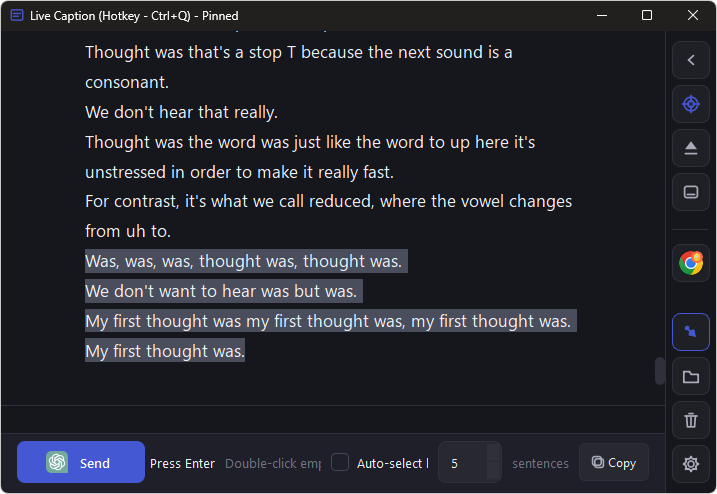
Live captions stream into a local transcript you can review and select.
Finder Tool targeting
Crosshair any chat window — ChatGPT, Slack, Notion, whatever you use.
Paste into every window
One hotkey sends the latest lines into all registered targets.
Global hotkey
Works while the app is in the background. Remappable.
Live Caption View
Floating transcript window with selection and real-time copy.
Front, minimize, opacity
Keep it out of the way at 30–100% opacity.
Choose a term. Unlock Pro.
No subscription. Buy 1–12 months or 1–3 years — redeem in the app on one PC. When a term ends, the app reverts to Free; your transcript and settings stay put.
- 1 target window
- Personal use
- Send works (upgrade reminders)
- No account
- One-time · pick 1–12 months
- Unlimited targets · commercial use
- 1 licensed PC
- Volume discounts at checkout
- One-time · pick 1–3 years
- Unlimited targets · commercial use
- 1 licensed PC
- Best for long-term use
Requirements
Windows 10/11 (64-bit) plus a caption source: Chrome/Edge Live Caption, Windows 11 Live Captions, and/or offline Vosk. No Mac or Linux.